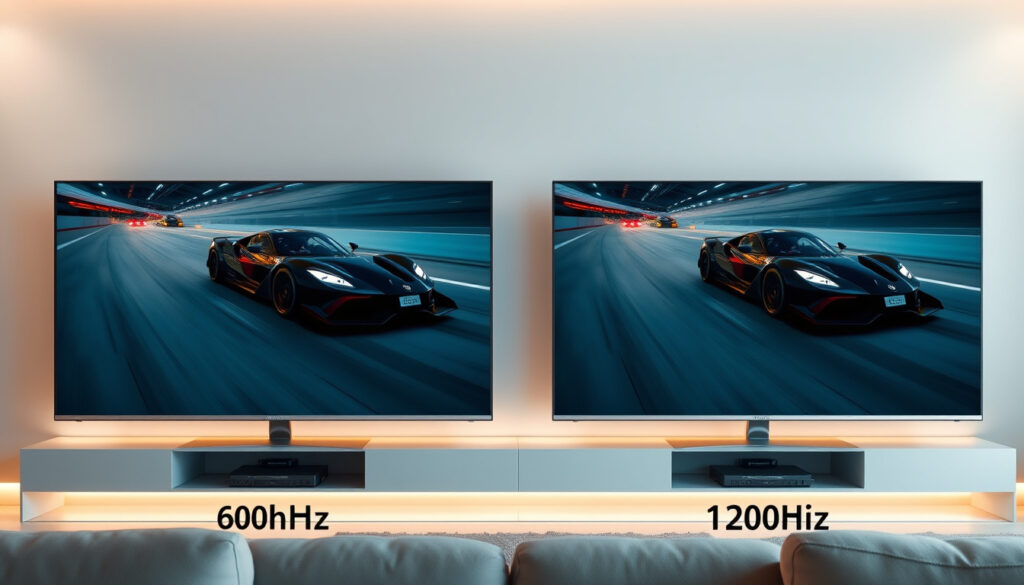
TV Refresh Rate Explained: 60Hz vs 120Hz – Which Is Better
If you’ve ever watched a fast-moving sports play and felt the image looked slightly blurry, you’ve experienced the limits of a standard 60Hz TV — the number of times per second the screen updates — but a growing number of models now offer 120Hz, promising smoother motion and better gaming performance. Understanding the difference can save you money or help you choose the right TV for how you actually watch.
Common refresh rates: 60Hz, 120Hz, 144Hz ·
Standard TV refresh rate: 60Hz for most content ·
120Hz benefit: Smoother motion for sports and gaming ·
4K 120Hz availability: Mid-range and high-end TVs since 2020 ·
PS5 / Xbox Series X support: 120Hz on compatible TVs
Quick snapshot
- 60Hz is standard for broadcast and streaming (Eureka Patsnap (technology research platform))
- 120Hz reduces motion blur by about 50% compared to 60Hz (KTcPlay Technology Hub (gaming display specialist))
- Netflix streams at 60Hz maximum (DisplayNinja (display review site))
- 4K 120Hz requires HDMI 2.1 (Eureka Patsnap (technology research platform))
- Whether most viewers perceive a difference between 60Hz and 120Hz in typical viewing
- Impact of TV interpolation on perceived smoothness
- Real-world benefit of 120Hz for movie watching given 24fps content
- 2010s: 60Hz becomes standard for HD TVs
- 2017: First 120Hz 4K TVs appear with HDMI 2.0 (1080p 120Hz)
- 2020: HDMI 2.1 enables 4K 120Hz; PS5 and Xbox Series X released
- 2023: 120Hz becomes common on mid-range and premium TVs
- 120Hz becoming baseline for mid-range models by 2026
- More streaming services may adopt higher frame-rate content
- HDMI 2.1 penetration will make 4K 120Hz more accessible
For the average viewer who watches mostly news, movies, and scripted shows on Netflix, a 60Hz TV delivers everything needed. The extra cost of 120Hz only pays off if you regularly watch live sports or game on a PS5 or Xbox Series X.
Here’s a quick reference of refresh rate specifications.
| Spec | Value |
|---|---|
| Refresh rate definition | Number of times per second the screen updates image |
| Standard for most TVs | 60Hz |
| High refresh rate standard | 120Hz |
| Content frame rates | 24fps (movies), 30fps/60fps (streaming), up to 120fps (gaming) |
| HDMI version for 4K 120Hz | HDMI 2.1 |
What Refresh Rate Is Good for TV?
Understanding refresh rate basics
- A 60Hz TV refreshes the image 60 times per second, while a 120Hz TV doubles that to 120 times per second (Eureka Patsnap (technology research platform)).
- This refresh cycle determines how smoothly motion appears — faster refresh means less blur and judder.
- The jump from 60Hz to 120Hz cuts frame persistence from 16.7ms to 8.3ms, halving the time a single frame stays on screen (KTcPlay Technology Hub (gaming display specialist)).
60Hz suitability for most content
For everyday TV watching — news, reality shows, streaming series, and kids’ programming — 60Hz is perfectly adequate. Most broadcast and streaming content is delivered at 30 or 60 frames per second, which matches the TV’s native refresh rate. A 60Hz set will display these without any extra processing. As display expert from explainerguy01 (YouTube channel) notes, 60Hz is “totally fine” for casual viewing.
Even movies shot at 24 frames per second look natural on a 60Hz screen because the TV uses a technique called 3:2 pulldown to fit the 24 frames into 60 refreshes. Some viewers notice a slight judder during slow pans, but most people never see it.
When 120Hz makes sense
- Sports: Fast-moving action like soccer, basketball, or Formula 1 benefits from 120Hz because each frame appears for half the time, reducing motion blur (KTcPlay Technology Hub (gaming display specialist)).
- Gaming: A 120Hz TV can display up to 120 frames per second from a PS5 or Xbox Series X, making gameplay feel more responsive and fluid (Eureka Patsnap).
- Movies: Because 120 is evenly divisible by 24, 120Hz TVs can display 24fps film content without pulldown judder, delivering smoother pans (DisplayNinja (display review site)).
The decision hinges on your primary content type.
Does 60Hz vs 120Hz Really Matter?
Four key differences, one pattern: 120Hz improves motion clarity but only when the content can deliver enough frames to fill it.
| Aspect | 60Hz TV | 120Hz TV |
|---|---|---|
| Motion blur reduction | Baseline | ~50% less blur (8.3ms persistence vs 16.7ms) (KTcPlay) |
| Movie judder (24fps) | Slight 3:2 pulldown judder | Judder-free 5:5 pulldown (DisplayNinja) |
| Gaming fluidity (120fps) | Not possible | Full 120fps support with VRR (Eureka Patsnap) |
| Sports perception | Acceptable | Noticeably smoother (explainerguy01) |
Perceived difference in regular viewing
For non-gamers and non-sports fans, the difference between 60Hz and 120Hz is subtle during everyday content. Most streaming services max out at 60fps, so the TV cannot show more frames than it receives. However, 120Hz processing can still reduce motion blur through backlight scanning or interpolation, though those techniques can introduce artifacts. Viewer discussions on Reddit (user opinions forum) indicate that while some notice the smoothness, others find it negligible.
Gaming performance impact
The biggest argument for 120Hz is gaming. A 120Hz TV with HDMI 2.1 can accept 4K at 120 frames per second from the latest consoles. The reduction in input lag and the fluidity of motion are immediately apparent when switching from 60Hz to 120Hz in a fast-paced shooter or racing game (explainerguy01 (YouTube channel)). For story-driven single-player games capped at 30–60fps, a 60Hz set remains perfectly fine.
Content availability and source limitations
Most movies are still shot at 24fps, and streaming platforms like Netflix do not offer native 120Hz streams. The TV’s internal processor can create interpolated frames to fill in the gaps, but purists often disable this “soap opera effect.” The bottom line: your content source determines how much benefit you get from 120Hz.
A 120Hz TV costs roughly $200–$500 more than an equivalent 60Hz model. If you never play a console game or watch live sports, that premium buys you almost nothing in daily use. For gamers, the difference is night and day.
For those not in the gaming or sports camps, the premium for 120Hz is hard to justify.
Is Netflix 60Hz or 120Hz?
Netflix maximum output
- Netflix streams video at up to 60 frames per second (DisplayNinja).
- There is no native 120Hz content available on Netflix as of 2025.
- The platform’s highest quality tier (4K with HDR) uses 24, 30, or 60fps encoding.
The 2 minute rule explained
Netflix uses a two-minute window after playback begins to assess your connection and display resolution. This “2 minute rule” is about adaptive bitrate streaming, not refresh rate. It has no direct relation to whether your TV shows 60Hz or 120Hz. The TV’s refresh rate is handled independently of Netflix’s content delivery.
120Hz processing on Netflix content
Even though Netflix doesn’t send 120fps video, a 120Hz TV can still process the 60fps stream using motion interpolation or black frame insertion to reduce perceived blur. The result can look smoother, though some viewers dislike the artificial look. Ultimately, for Netflix viewing, a 60Hz TV delivers exactly what the service provides — no improvement from a 120Hz set in terms of actual frame rate.
Netflix’s current streaming cap means 120Hz offers little for most of its content.
Is It Worth Getting a 120Hz TV?
Cost vs benefit analysis
A 120Hz TV typically costs 20–40% more than a comparable 60Hz model. For example, a 55-inch 60Hz LED may retail for $400, while the 120Hz version of the same size and brand often starts at $550. The premium pays for the faster panel, HDMI 2.1 ports, and usually better image processing features like VRR and ALLM (Eureka Patsnap).
| Use case | 60Hz sufficient? | 120Hz worth the extra? |
|---|---|---|
| Cable news, talk shows | Yes | No |
| Streaming movies/series | Yes | No |
| Live sports | Yes but not ideal | Yes |
| PS5 / Xbox Series X gaming | No (if targeting 120fps) | Yes (Eureka Patsnap) |
| PC gaming at 120fps | No | Yes |
Use cases that justify 120Hz
- You own a PS5, Xbox Series X, or a gaming PC capable of 120fps output.
- You watch live sports (football, basketball, F1) several hours a week.
- You are sensitive to motion blur and want the clearest possible image for action content.
- You plan to keep the TV for 5+ years and want it future-proofed for higher frame rate streaming.
Gaming and sports viewers
For these two groups, the value proposition is clear. In gaming, the responsiveness of 120Hz can improve reaction times in competitive titles (KTcPlay). For sports, the smoother motion makes the difference between seeing the ball clearly and tracking a blur. A 120Hz TV with good motion handling can transform the experience.
A casual viewer who buys a 120Hz TV expecting a “better picture” for Netflix dramas will likely be disappointed. The money spent on 120Hz is better put toward a larger screen size or higher contrast panel.
Upsides
- Smoother motion in sports
- Better gaming experience with 120fps
- No pulldown judder for 24fps movies
- Usually includes VRR and ALLM
- Future-proof for higher frame rate content
Downsides
- Higher cost ($200–$500 premium)
- Limited content takes advantage of 120Hz
- Motion interpolation can look artificial
- HDMI 2.1 needed for 4K 120Hz
- No benefit for most streaming/movies
Evaluating your own usage will guide the right purchase decision.
Which Is Better, 4K 60Hz or 4K 120Hz?
Seven specs, one pattern: 4K 120Hz demands more from your hardware but delivers superior motion clarity when the source can keep up.
| Spec | 4K 60Hz | 4K 120Hz |
|---|---|---|
| Resolution | 3840 x 2160 | 3840 x 2160 |
| Refresh rate | 60Hz | 120Hz |
| HDMI version required | HDMI 2.0 | HDMI 2.1 (Eureka Patsnap) |
| Max frame rate from console | 60fps | 120fps |
| Motion blur (8.3ms) | 16.7ms persistence | 8.3ms persistence |
| Variable Refresh Rate (VRR) | Rare | Common |
| Auto Low Latency Mode (ALLM) | Rare | Common |
| Typical price (55-inch) | $400–$600 | $600–$900 |
4K resolution importance
4K resolution should be your first priority. The extra detail is visible on any screen larger than 40 inches, even from a normal seating distance. A 4K 60Hz TV will look sharper than a 1080p 120Hz TV for all content. Resolution affects every pixel; refresh rate only affects motion clarity.
Refresh rate impact on motion
4K 120Hz combines the detail of 4K with the fluidity of 120Hz. This combination is most beneficial for gaming, where you can get both high detail and smooth motion simultaneously. For movies and streaming, the refresh rate adds less to the experience than the resolution does (explainerguy01 (YouTube channel)).
Hardware requirements for 4K 120Hz
To run 4K at 120Hz, you need a TV with HDMI 2.1 ports, a high-speed HDMI 2.1 cable, and a source device that outputs 4K 120fps (PS5, Xbox Series X, or a modern gaming PC). Many budget “120Hz” TVs only support 120Hz at 1080p or 1440p, not 4K. Always check the fine print before buying (DisplayNinja).
The resolution-first approach remains the safest bet for most buyers.
How to Check TV Refresh Rate
Using TV settings menu
- Open the TV’s settings menu and look for “Picture” or “Display” options.
- Find an entry labeled “Refresh Rate,” “Screen Refresh Rate,” or “Motion Rate” (note: Motion Rate is often marketing, not actual refresh rate).
- On Sony, Samsung, and LG TVs, the actual panel refresh rate is usually listed under “Support” or “About.”
Online tools and test patterns
Websites like TestUFO (motion test utility) let you check your TV’s refresh rate by displaying a moving test pattern. If you view the site on a browser connected to your TV, the test will show the actual refresh rate being used. Blur Busters’ UFO test is the industry standard for this kind of check.
Manufacturer specifications
Look up the exact model number on the manufacturer’s official website. The spec sheet will list “Panel Refresh Rate” or “Native Refresh Rate.” Beware of terms like “Motion Rate 240” or “TruMotion 240” — those indicate marketing-enhanced processing, not native 120Hz. A true 120Hz TV will explicitly say “120Hz Native” in the specifications (Reddit community).
Many retailers list “Effective Refresh Rate” or “Motion Rate” that is double the native refresh rate. A TV with “Motion Rate 120” may only have a 60Hz panel with frame interpolation. Always check the native spec before buying.
Verifying the native refresh rate prevents marketing confusion.
Confirmed Facts vs. What’s Unclear
Confirmed facts
- 60Hz is standard for broadcast and streaming (Eureka Patsnap)
- 120Hz reduces motion blur by about 50% compared to 60Hz (KTcPlay)
- Netflix streams at 60Hz maximum (DisplayNinja)
- 4K 120Hz requires HDMI 2.1 (Eureka Patsnap)
- 120Hz TVs support VRR and ALLM (Eureka Patsnap)
What’s unclear
- Whether most viewers perceive a difference between 60Hz and 120Hz in typical viewing
- Impact of TV interpolation on perceived smoothness
- How much 120Hz adoption will accelerate in streaming services
These open questions highlight the need for personal testing.
Expert Perspectives on Refresh Rate
“The jump from 60Hz to 120Hz is the single largest improvement most users experience. Beyond that, diminishing returns set in quickly.”
— KTcPlay Technology Hub (gaming display specialist)
“For everyday TV watching like news and kids’ shows, 60Hz is totally fine. It’s when you get into sports and gaming that 120Hz starts to matter.”
— explainerguy01 (YouTube display expert)
“120Hz TVs are better for playing video games and watching native 24FPS movies because 120 is divisible by 24, eliminating the flicker that 60Hz causes.”
— DisplayNinja (display review site)
The consensus across sources is clear: 120Hz is a meaningful upgrade for specific use cases but not a universal necessity.
Summary
Choosing between 60Hz and 120Hz comes down to what you watch and how you watch it. A 60Hz TV handles all streaming, broadcast, and movie content without issue, and it saves you money. A 120Hz TV shines with live sports and console gaming, where the smoother motion and lower input lag improve the experience noticeably. For the typical buyer in the US market who watches Netflix and cable, the decision is simple: put your budget toward a larger screen or better picture quality rather than a higher refresh rate.
If you’re trying to decide between 60Hz and 120Hz for your next television, our detailed TV refresh rate explained covers exactly what those numbers mean for movies, sports, and gaming.
Frequently asked questions
What is the difference between 60Hz and 120Hz on a TV?
60Hz refreshes the image 60 times per second; 120Hz refreshes 120 times per second. This doubles the motion clarity and reduces blur for fast-moving content.
Do all 4K TVs have 60Hz?
Most entry-level and mid-range 4K TVs have 60Hz panels. Premium models often feature 120Hz native refresh rates.
What refresh rate do I need for sports?
120Hz is recommended for sports viewing because it reduces motion blur during fast action like soccer, football, and racing.
Can a 60Hz TV play 120fps content?
No. A 60Hz TV cannot display more than 60 frames per second. To see 120fps, you need a 120Hz display and a compatible source.
Is 120Hz better for watching movies?
Yes, because 120 is divisible by 24, it eliminates the judder caused by 3:2 pulldown on 60Hz TVs. However, most viewers may not notice the difference.
Does the PS5 support 120Hz?
Yes, the PS5 supports 120Hz output at up to 4K resolution via HDMI 2.1, and many games offer a 120fps performance mode.
How does TV refresh rate affect video games?
Higher refresh rates (120Hz) provide smoother motion, reduced input lag, and a more responsive feel in fast-paced games.
What is motion interpolation and how does it relate to refresh rate?
Motion interpolation is a processing technique that creates intermediate frames to increase perceived smoothness. It can make 30fps content look like 60fps, but may introduce a “soap opera effect.”
More related posts
 Watch Tenacious D in the Pick of Destiny: Streaming Guide
 Cast Of White Lotus Season 3
 Sex Lives Of College Girls Cast
 Cast Of Descendants The Rise Of Red
 Dallas Cowboys Schedule 2025: Full List, Key Games, and Analysis
 Cast Of The Amateur 2024 Film
 Watch The Grim Adventures of Billy and Mandy: Streaming Guide
Cast Of My Oxford Year
Watch The Grim Adventures of Billy and Mandy: Streaming Guide
Cast Of My Oxford Year